An AI video for your business jingle
Upload your song → see a 10-second preview of your music video
No subscription · $5 preview
Updated
Quick answer
How can a small business make a video for its jingle? Upload the jingle audio to Clipbeat, describe your business and the look you want, hear the $5 chorus preview, then check the scene-by-scene plan. A jingle costs from $5 (Standard), $19 (Plus) or $39 (Premium, with lip-sync), paid once — no subscription, no agency.
A jingle is the cheapest piece of branding a local business can own: a bakery, a car wash, a dentist, a radio spot, a shop that wants a tune people hum on the way out. The hard part used to be the video. Social feeds, YouTube pre-roll and the screen behind the counter all want something to watch, and an agency video for a twenty-second tune rarely makes sense.
Clipbeat makes that video from the jingle itself. You upload the audio, describe the business and the style, and it plans a scene for every sung line, puts the words on screen as they are sung and cuts on the beat. Short jingles fall in the lowest price bracket, so a finished video costs the same as a lunch.
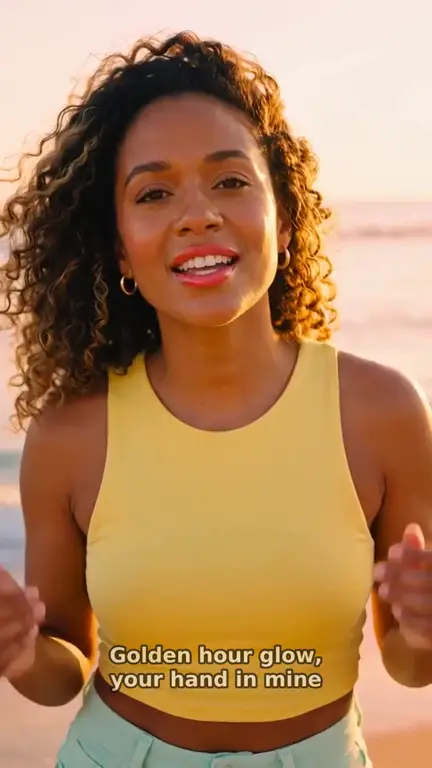
Real output · “Golden Hour Glow”, pop
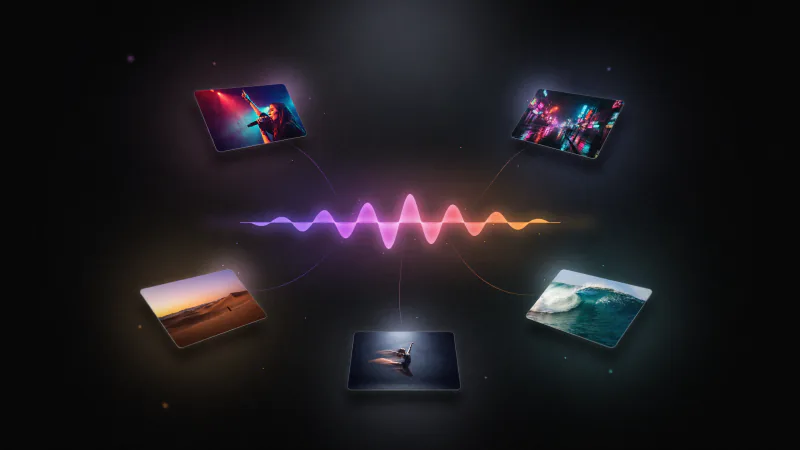
Clipbeat at a glance
| Price per video | from $5 Standard, $19 Plus or $39 Premium — one-time, priced by song length; a 4-minute song is $14 Standard, $30 Plus or $69 Premium |
|---|---|
| Longer songs | Priced by length, up to 20 minutes; the exact price is shown before you pay |
| Before you pay | Your upload, the timed lyrics and your brief (who sings, the style, the places) — no card needed |
| Scene-by-scene plan | After the $5 chorus preview, before you pay for the full video |
| Chorus preview | A short lip-synced clip of your singer singing your chorus, included in the $5 credit pack |
| Subscription | None — nothing renews |
| Lip-sync | Plus, Premium and Pro (the singing shots follow your vocal) |
| Output | 1080p MP4 without a watermark, 16:9 or 9:16 (1:1 and 4:5 from the editor) |
| Upload | MP3, WAV, M4A, FLAC or AIFF, up to 500 MB |
| Lyrics | Transcribed automatically in 50+ languages, shown word by word, karaoke-style |
How it works
- STEP 1
Upload the jingle
Drop in the jingle as MP3 or WAV — the version from your musician, your radio spot or an AI music tool.
- STEP 2
Describe the business and the look
Tell the AI Director what you sell, who your customers are and the mood: bright and friendly, premium and calm, retro, cartoon. Name the setting — a bakery counter, a sunny car wash, a modern clinic.
- STEP 3
Check the scene plan
Every sung line gets a planned scene. Adjust any scene so it shows your kind of place, product or service.
- STEP 4
Pay once and add your branding
Choose from $5 Standard, $19 Plus or $39 Premium. When the video lands in Studio, add your logo image or product photos on the timeline — for example as an end card with your address.
A real example: “Golden Hour Glow”
A full pop song made into a video with Clipbeat on Premium — 16 scenes, one for every lyric line, the same singer throughout and 5 lip-synced singing shots.
Where a jingle video gets used
One short video covers most of the places a small business shows up:
- Instagram Reels, TikTok and YouTube Shorts in 9:16, with the lyrics on screen for people watching without sound.
- YouTube and website embeds in 16:9.
- A looping video on the TV or display screen in your shop, salon or waiting room.
- Local ads and posts in community groups, where a catchy tune with captions stands out.
What it costs for a short jingle
Jingles are short, so they sit in the base price bracket — up to 2 minutes. You pay once for that video, with no subscription and no monthly fee. Pick the tier by how much lip-sync and polish you want (every tier is full motion):
- Standard (from $5) — the full song with a scene for every lyric line, full motion, word-by-word karaoke lyrics, 1080p without a watermark.
- Plus (from $19) — everything in Standard (full motion, a scene for every lyric line, word-by-word karaoke lyrics, 1080p without a watermark), plus your singer lip-syncing the chorus with your vocals (2–3 shots).
- Premium (from $39) — full motion with the best image and motion models, extra quality checks on every shot, and real lip-sync on up to 12 singing shots.
Making the video feel like your business
The AI makes the scenes, but you decide what they show. Be specific in the description: "a family bakery with fresh bread on wooden shelves and a smiling baker", not just "a shop". Name colours that match your brand, and say whether you want people on screen or only products and places.
Because the video is on a normal timeline, you can drop in your own material after it is made: a logo, photos of your storefront or products, a short clip you filmed on your phone. Placing your own media costs nothing, and if you build an edit yourself in the editor, any credit pack (from $5, one-time) unlocks 1080p without the watermark.
No jingle yet?
You need an audio file to start. If you do not have a jingle, a local musician, a voice-over studio or an AI music tool can make one; Studio's editor can also generate a short AI song with vocals, billed in credits. Whatever you use, make sure the terms allow commercial use — for AI-generated music, the tool's own terms decide what you may use in advertising.
Example
We do not have a business jingle in the showcase yet, so the video on this page is "Golden Hour Glow", a pop demo song made with the same process on Premium ($39): 16 scenes over 2:02, the same performer throughout and karaoke lyrics. A jingle works the same way, just with fewer lines and scenes.
A sensible way to start
For most local businesses Standard ($5) is enough: a scene for every line, every scene in full motion. Plus ($19) adds a singer lip-syncing the chorus of your jingle. Premium is worth it if a singer appears on camera throughout and you want the mouth to follow every sung line.
Frequently asked questions
How much does a jingle video cost?
For a jingle up to 2 minutes: from $5 Standard, $19 Plus or $39 Premium, paid once. No subscription.
Can I add my logo?
Yes. The finished video opens on the Studio timeline, where you can add your logo image, product photos or your own clips and export again.
Can I use the video in ads?
The video is yours to use, subject to the rights in your jingle and the terms of the AI models used for the visuals. If the jingle was made with an AI music tool, check that its terms allow commercial use.
Can I get a vertical version for Reels and TikTok?
Yes. Set the project to 9:16 for a vertical video, or export a 9:16 version from the editor alongside the 16:9 one.
Is there a trial?
Uploading the jingle and the brief come before you pay. The $5 chorus preview comes first, then the full scene-by-scene plan; the finished video is a one-time payment.
Make a video for your jingle
Upload the jingle, preview the chorus and read the scene plan. From $5 one-time, no subscription.
Make my video