Make a music video for YouTube from your audio
Upload your song → see a 10-second preview of your music video
No subscription · $5 preview
Updated
Uploading a song to YouTube with a single still image works, but it rarely holds attention. Listeners skip, the algorithm sees short watch time and the song never gets the chance it deserves. A real music video — even a simple one — gives people something to watch for the whole track and gives the release a proper home on your channel.
Clipbeat turns your audio file into a widescreen music video built for YouTube. It transcribes the lyrics with word-level timing, plans a scene for every lyric line, keeps one main character across the video, cuts on the beat and renders a 16:9 file at 1080p. You can download it or publish it straight to your connected YouTube channel.
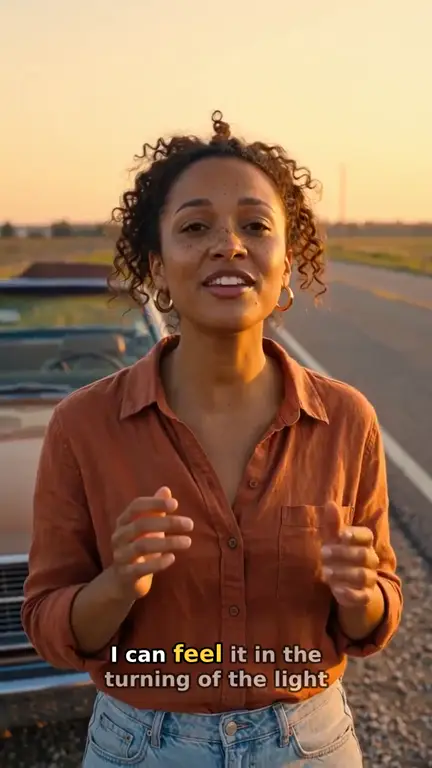
Real output · “Golden Road Home”, acoustic folk
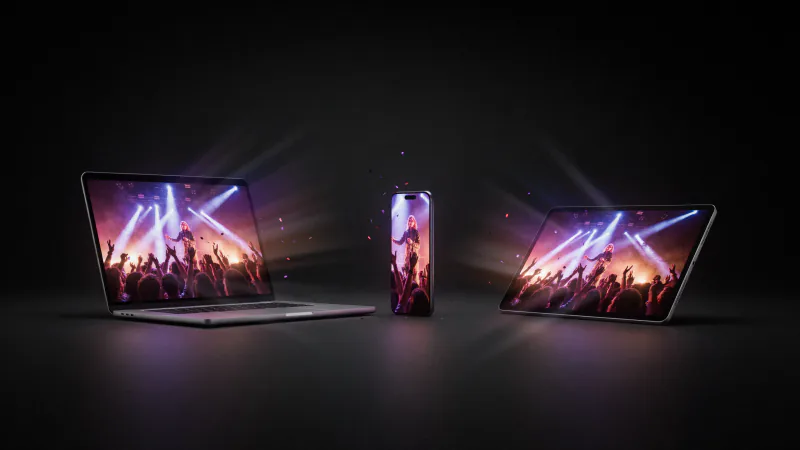
Clipbeat at a glance
| Price per video | from $5 Standard, $19 Plus or $39 Premium — one-time, priced by song length; a 4-minute song is $14 Standard, $30 Plus or $69 Premium |
|---|---|
| Longer songs | Priced by length, up to 20 minutes; the exact price is shown before you pay |
| Before you pay | Your upload, the timed lyrics and your brief (who sings, the style, the places) — no card needed |
| Scene-by-scene plan | After the $5 chorus preview, before you pay for the full video |
| Chorus preview | A short lip-synced clip of your singer singing your chorus, included in the $5 credit pack |
| Subscription | None — nothing renews |
| Lip-sync | Plus, Premium and Pro (the singing shots follow your vocal) |
| Output | 1080p MP4 without a watermark, 16:9 or 9:16 (1:1 and 4:5 from the editor) |
| Upload | MP3, WAV, M4A, FLAC or AIFF, up to 500 MB |
| Lyrics | Transcribed automatically in 50+ languages, shown word by word, karaoke-style |
How it works
- STEP 1
Upload your track
Drop the mp3 or wav you would release. Made the song with Suno? Download it from Suno first, then upload the file.
- STEP 2
Keep the project at 16:9
Widescreen is the right shape for a YouTube video page and for TVs. The full-song video follows the project aspect, so 16:9 gives you a landscape result.
- STEP 3
Approve the scene plan
Read the scene plan against your lyrics, change what does not fit your song and describe the look you want.
- STEP 4
Pay once, then publish
Choose Standard ($5), Plus ($19) or Premium ($39). Download the 1080p file or publish it directly to your connected YouTube channel.
A real example: “Golden Road Home”
A full acoustic folk song made into a video with Clipbeat on Premium — 20 scenes, one for every lyric line, the same singer throughout and 5 lip-synced singing shots.
What YouTube viewers expect from a music video
On YouTube a music video competes with everything else on the home page. Viewers who click want the song to be the star and the picture to keep moving with it. The common formats are the full music video with a story, the lyric video where the words carry the visual, and the visualizer. Clipbeat's default sits between the first two: a story told scene by scene, with the lyrics on screen as they are sung.
That combination is useful for independent artists in particular. On-screen lyrics help new listeners understand the song on first play, and frequent scene changes — one per lyric line, cut on the beat — keep the pace close to a professionally edited video without hiring an editor.
Built for the YouTube format
A few details matter when the destination is YouTube rather than a phone feed:
- 16:9 widescreen frame, the native shape of the YouTube player and TV apps
- 1080p export without a Clipbeat watermark on every paid tier
- Word-by-word karaoke lyrics, readable on a laptop or a living-room screen
- The full song, not a short loop — every verse, chorus and bridge gets scenes
- Direct publishing to a connected YouTube channel, or a file you upload yourself
See a finished widescreen example
The embedded example is "Golden Road Home", a acoustic folk demo song made for the showcase on Premium ($39). It is 2:24 long, in 16:9, with 20 scenes and the same main character from the first scene to the last. The making-of page lists every scene with its lyric line and prompts, so you can see exactly how a YouTube-ready video is put together.
Upload tips that help the video get found
The video is only half of a good YouTube release. Before you publish, spend a few minutes on the details YouTube uses to understand and recommend it:
- Title: artist name, song title and the format, for example "Artist — Song (Official Music Video)" or "(Lyric Video)".
- Description: a short line about the song, streaming links, credits and the full lyrics. Lyrics in the description help people searching for a line they remember.
- Chapters: if the song has a long intro or distinct sections, add timestamps such as 0:00 Intro, 0:45 Chorus to make navigation easier.
- Thumbnail: pick a frame with a clear face or a strong colour, not a busy wide shot.
- End screen: link your next song or a playlist so a finished view leads to the next one.
Rights and Content ID
You need the rights to the music you upload. If your song is distributed through a service that registers it with YouTube Content ID, your own upload may receive a claim from your own distributor; most distributors let you whitelist your channel so your official video is not claimed. Check this before release day.
For songs made with AI music tools, the tool's terms decide whether you may publish and monetise the track. Clipbeat makes the visuals and the finished video file; you own the result, subject to the rights in your music and the terms of the AI models used.
Pricing for a YouTube music video
A YouTube video from Clipbeat is a one-time purchase per song: from $5 Standard, $19 Plus or $39 Premium. The lyric-matched storyboard comes after the $5 chorus preview, before you pay for the video, and checkout shows your local price.
- Standard (from $5) — the full song with a scene for every lyric line, full motion, word-by-word karaoke lyrics, 1080p without a watermark.
- Plus (from $19) — everything in Standard (full motion, a scene for every lyric line, word-by-word karaoke lyrics, 1080p without a watermark), plus your singer lip-syncing the chorus with your vocals (2–3 shots).
- Premium (from $39) — full motion with the best image and motion models, extra quality checks on every shot, and real lip-sync on up to 12 singing shots.
If you publish on YouTube every week
Artists who release often can also use Studio as a full editor with no subscription: any credit pack (from $5, one-time) unlocks 1080p without the watermark for your own edits, and credits pay for AI generations. For a single release, the one-time video is the simpler choice.
Frequently asked questions
Can I make a YouTube music video from just an audio file?
Yes. Upload the mp3 or wav and Clipbeat builds a lyric-matched storyboard from it. The finished 16:9 video starts at $5 one-time.
What resolution is the video?
Paid videos are exported at 1080p without a watermark, which is the standard full-HD size for YouTube.
Can Clipbeat upload to my channel?
Yes. Connect your YouTube account and publish directly from Clipbeat, or download the file and upload it yourself in YouTube Studio.
Will my own video get a Content ID claim?
It can, if your distributor registered the song with Content ID. Ask your distributor to whitelist your channel before you publish the official video.
Can I also make a vertical version for Shorts?
Yes. Set a project to 9:16 for a vertical video, or export a section of the song in 9:16 from the editor for Shorts.
Give your next release a real YouTube video
Upload your song, preview the chorus and get a scene plan matched to your lyrics. Your 1080p YouTube video from $5 one-time, no subscription.
Make my video