Turn your lyrics into a music video
Upload your song → see a 10-second preview of your music video
No subscription · $5 preview
Updated
Quick answer
Can I turn my lyrics into a music video? Yes, once the lyrics are sung on a recording. Clipbeat makes the video from your audio file, not from text alone: upload the song, the lyrics are transcribed and synced word by word, and every line gets its own scene. The scene plan comes after the $5 chorus preview; the full video is from $5 one-time. Only have lyrics? Studio can first generate a sung AI song from them, billed in credits.
Lyrics are the backbone of a music video: they tell the story, set the images and decide where the cuts go. Clipbeat uses them exactly that way — each line of your song becomes a scene that shows what the line is about, and the words appear on screen at the moment they are sung.
There is one honest condition. The video is built from a recording, because the timing of every scene and every word comes from the vocal. A text file of lyrics on its own has no rhythm, no length and no beat for the video to follow, so Clipbeat does not make a music video from lyrics alone.
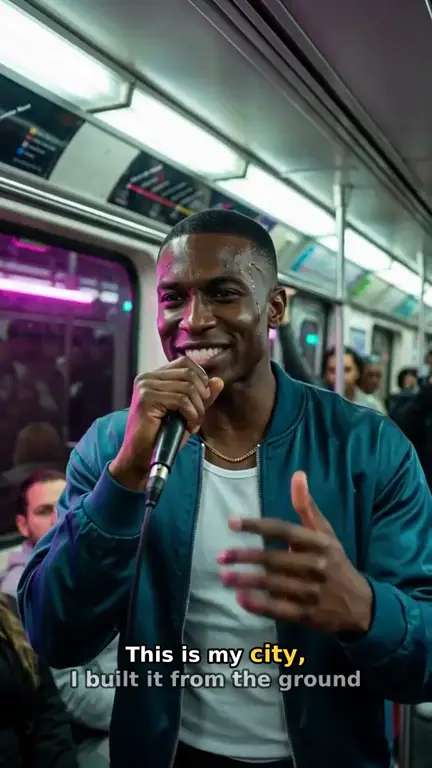
Real output · “Neon Crown”, hip-hop
Clipbeat at a glance
| Price per video | from $5 Standard, $19 Plus or $39 Premium — one-time, priced by song length; a 4-minute song is $14 Standard, $30 Plus or $69 Premium |
|---|---|
| Longer songs | Priced by length, up to 20 minutes; the exact price is shown before you pay |
| Before you pay | Your upload, the timed lyrics and your brief (who sings, the style, the places) — no card needed |
| Scene-by-scene plan | After the $5 chorus preview, before you pay for the full video |
| Chorus preview | A short lip-synced clip of your singer singing your chorus, included in the $5 credit pack |
| Subscription | None — nothing renews |
| Lip-sync | Plus, Premium and Pro (the singing shots follow your vocal) |
| Output | 1080p MP4 without a watermark, 16:9 or 9:16 (1:1 and 4:5 from the editor) |
| Upload | MP3, WAV, M4A, FLAC or AIFF, up to 500 MB |
| Lyrics | Transcribed automatically in 50+ languages, shown word by word, karaoke-style |
How it works
- STEP 1
Have the song recorded
Any finished recording with vocals works: a home demo, a studio master or an AI-generated song. MP3, WAV, M4A and FLAC are fine.
- STEP 2
Upload it to Clipbeat
The vocal is transcribed with a timestamp on every word. You can paste the lyrics you wrote to replace the transcript and keep the automatic timing.
- STEP 3
Read the scene plan
Each lyric line gets a scene description in the scene plan. Change any scene that does not match what you meant.
- STEP 4
Pay once and export
Choose from $5 Standard, $19 Plus or $39 Premium. The video is rendered with the lyrics synced on screen and exported in 1080p without a watermark.
A real example: “Still Burning Slow”
A full R&B / soul song made into a video with Clipbeat on Premium — 13 scenes, one for every lyric line, the same singer throughout and 0 lip-synced singing shots.
Why you need the recording, not just the words
A music video is timed to sound. The length of the video, the moment each scene starts, where the cuts fall and when each word lights up all come from the recorded vocal and the beat under it. The same lyric sung slowly as a ballad or fast as a rap needs a completely different video, and only the audio tells Clipbeat which one you made.
This is also why the lyrics stay accurate. Because the words are matched to the vocal, a line appears on screen when it is sung, not a second early or late, and a repeated chorus gets the same timing every time it comes back.
If you only have lyrics
If you have written a song but not recorded it, you have three options. Record a simple take yourself — a phone recording with a guitar or a beat is enough for the timing. Ask a singer or producer to record it. Or use the AI song generator in Studio's editor: paste your lyrics, describe the style and it makes a sung song with vocals, billed in credits. Whichever you choose, that recording then goes through the normal video flow.
Check the terms if you plan to release an AI-generated song commercially; the music tool's own rules decide what you may do with the audio.
How the lyrics appear on screen
By default the lyrics are shown as karaoke-style captions: the line appears with the scene and each word is highlighted at the exact moment it is sung. The captions are sized for the format of the project, so they stay readable on a phone in 9:16 and on a TV in 16:9.
Every word stays editable on the Studio timeline after the video is made. You can fix a misheard word, split a long line, change the caption style or turn the lyrics off for a cleaner, cinematic version of the same video.
How each line becomes a scene
The scene planner reads the whole song before it writes a single shot, so it understands the story, not just isolated sentences. A line about leaving home might become a car pulling away at dawn; a chorus about holding on might return to the same couple in a new place each time. The same main character carries through the whole video, which keeps it feeling like one story.
Abstract or poetic lyrics work too — the planner turns a metaphor into a concrete image you can actually film. If an interpretation misses, rewrite that scene in the plan before you pay for the video.
An example with synced lyrics
"Still Burning Slow" is an R&B / soul demo song, 1:35 long. 8 of its 13 scenes are built directly on a lyric line, with the words synced on screen. Watch it on this page to see how the lines turn into images.
Prices
Uploading the song and the transcription come before you pay; the scene-by-scene plan follows the $5 chorus preview. The full video is paid once: Standard ($5) gives every lyric line its own scene in full motion; Plus ($19) keeps every scene in motion; Premium ($39) adds lip-sync on the singing shots. There is no subscription.
Frequently asked questions
Can Clipbeat make a video from a lyrics text file only?
No. The video needs a recorded song for its timing. If you have only lyrics, record a take or generate a sung AI song in the Studio editor first.
Do I have to type the lyrics in?
No. The vocal is transcribed automatically with word-level timing. Pasting your own lyrics is optional and keeps the timing.
Are the lyrics synced word by word?
Yes. Each word is highlighted when it is sung, and every word and timestamp can be edited on the timeline.
Can I turn the lyrics off?
Yes. You can hide the captions or change their style in Studio and export a version without on-screen lyrics.
What languages work?
Transcription handles many languages. Check the timed lyrics in the preview, especially for mixed-language songs, and correct any word before paying.
Turn your lyrics into scenes
Upload the recorded song, preview the chorus and read the line-by-line scene plan. Your video from $5, paid once.
Make my video