How to make a lip-sync music video with AI
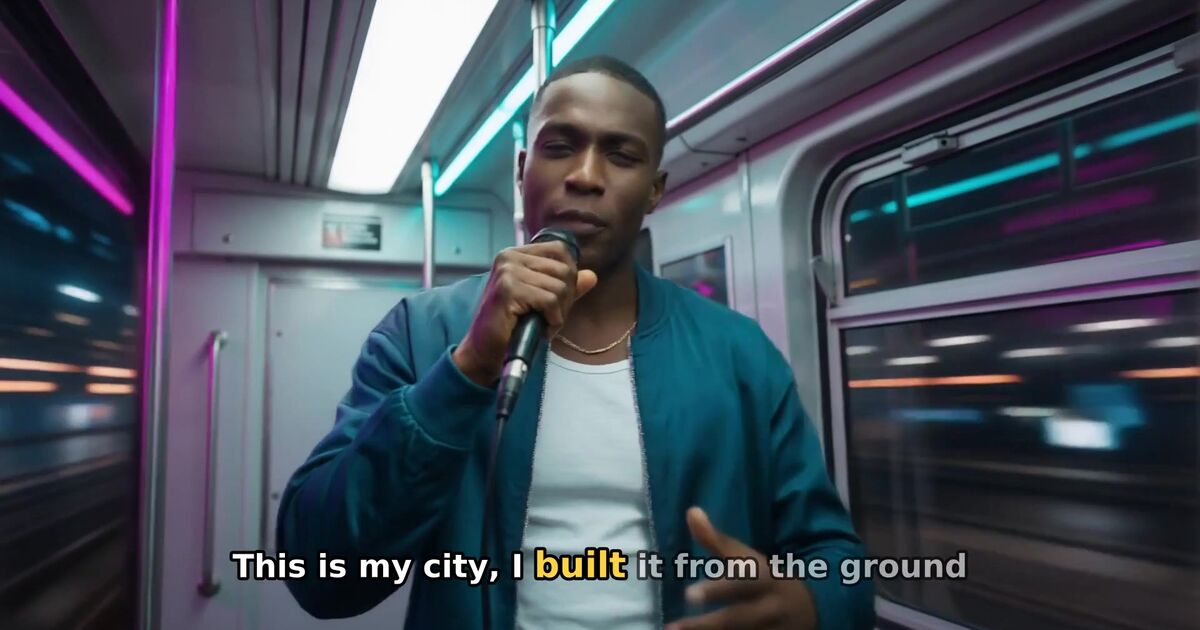
To make a lip-sync music video with AI, start from a finished song with a clear lead vocal, separate that vocal from the mix, and use it to drive the singer's mouth in close-up performance shots while story scenes carry the rest of the video. Keep one consistent singer across every shot, fix the lyrics before generating, and only lip-sync the lines that suit a face-to-camera performance. In Clipbeat, Plus (from $19) lip-syncs your singer on the chorus, Premium (from $39) lip-syncs up to 12 singing shots across the song, not every line, and the AI Director in Studio can add lip-synced shots to any project with credits.
A performance shot is the most shareable moment in most music videos — the artist looking into the lens and singing the hook. It is also the shot that exposes AI video fastest: if the mouth moves at random, viewers stop believing everything else. This guide explains how AI lip-sync works, how to prepare a song and a singer for it, which shots to sync and what the rules are for using a real person's face.
How AI lip-sync works
AI lip-sync takes two inputs — an image or video of a face, and an audio clip of the voice — and generates video in which the mouth, jaw and surrounding face move to match the sounds. Good models also add small head movements, blinks and breathing, so the result reads as a performance rather than a talking photo.
For music, there is an extra step. A full mix is a poor guide for a mouth: drums, bass, pads and backing vocals all compete with the lead line. So the song is first split into stems, and only the isolated lead vocal is used to drive the face. That isolated vocal is cut to the exact moment of each performance shot, so the mouth matches the syllables sung at that point in the song.
What makes lip-sync look good or bad
The model matters, but most bad results come from the inputs. In order of importance:
- The vocal. A clear, upfront lead vocal syncs well. Heavily layered harmonies, vocals buried under distortion, extreme autotune or a lot of reverb are harder to separate and to match.
- The shot. Lip-sync works best in close-ups and medium close-ups where the face is large, lit from the front and turned mostly towards the camera. A tiny face in a wide shot, or a profile, gives the model little to work with — and the viewer cannot see the mouth anyway.
- The singer. A clear, well-lit face with the mouth visible. Hands, microphones or hair covering the mouth cause artefacts.
- Shot length. Short performance shots of a few seconds look more natural than one long take, and they are how real music videos are cut.
Step by step: making a lip-sync music video
- Finish and master the song. Lip-sync follows the vocal exactly, so any timing edits after the video is made will break it. Export the final mix as MP3 or WAV.
- Upload it and fix the lyrics. Upload the song in Studio. The vocals are transcribed with word-level timing; correct any misheard words so the on-screen lyrics match what is sung.
- Describe your singer. Tell the AI Director who performs the song — age, style, clothes, setting. That main character is kept across every scene, so the performance shots all show the same artist.
- Decide which lines become performance shots. Pick the lines with the most emotion or the strongest hook — usually the chorus and a few key verse lines. Leave the rest to story and setting scenes.
- Generate with lip-sync. Choose Plus for a lip-synced chorus, Premium for up to 12 singing shots across the song, not every line, or add lip-synced shots to your project with the AI Director. The isolated vocal drives the mouth in each singing shot.
- Review the performance shots. Watch each one with sound. If a line feels off, regenerate that shot on the Studio timeline rather than the whole video, then export.
Which shots should be lip-synced?
Not every scene. Look at any professional music video and you will see a mix: the artist sings to camera in some shots, and the story, the setting and other people carry the rest. That rhythm keeps the video interesting and gives the performance shots more impact when they come.
A good starting point:
- Lip-sync: the chorus lines, the opening line of each verse and any line the song is known for.
- Do not lip-sync: instrumental sections, wide establishing shots, story scenes with other characters and lines where the singer is shown from behind or far away.
In the lip-synced videos in the Clipbeat showcase, singing shots are a minority — the hip-hop example has 8 lip-synced shots out of 20 scenes — and the rest are story and setting shots. Each example page lists every scene and marks which ones are lip-synced.
Keep the same singer in every shot
Lip-sync only helps if the viewer believes it is the same person singing throughout. If the singer's face changes between the verse and the chorus, perfect mouth movement will not save the video. Use one main character, described once and reused for every shot, with the same outfit within a section of the song. Clipbeat locks the main character across all scenes; if you work by hand, reuse the same reference image. Our guide to consistent characters in AI video explains why faces drift and how to stop it.
Using your own face (and the rules)
You can star in your own lip-sync video. In Clipbeat you can use your own face — through "My photo" (one clear, front-facing photo of your face), a saved character or "My artist" — and lip-sync it to your own vocal, and you can also clone your own voice. The rules are strict and they exist for good reasons:
- Only your own face and voice, or another adult who clearly agreed that you may use theirs.
- No celebrities or public figures, ever — not even with their permission.
- No impersonation or deceptive deepfakes. Never make people believe a real person sang or said something they did not.
- No photoreal minors.
The full rules are in the Acceptable Use Policy. If you would rather not appear yourself, an AI-generated singer built from your description works the same way.
Lip-sync for rap, ballads and fast songs
Different styles need different handling:
- Rap and fast vocals. The mouth has to move quickly and precisely. Keep performance shots short, and choose lines with clear enunciation over the fastest ad-libbed sections.
- Ballads. Long held notes look unnatural if the mouth closes too early. Close-ups with soft camera motion work well; the face carries the emotion.
- Choruses with stacked vocals. Separation is harder. If a chorus is heavily layered, sync the verse lines instead and use wider, energetic scenes for the chorus.
- Non-English songs. Transcription covers more than 50 languages, and lip-sync follows the sound rather than the words, so it is not tied to English.
What it costs
In Clipbeat, uploading your song, the timed lyrics and the brief come before any payment. The first payment is the $5 chorus preview, which shows your singer lip-syncing the chorus; after it you see the lyric-matched scene plan. The full-song video is one-time and priced by song length: from $5 Standard (no lip-sync), $19 Plus (your singer lip-synced on the chorus, 2–3 shots) or $39 Premium (the best image and motion models, extra quality checks on every shot and lip-sync on the singing shots across the song). You see the exact price for your song before you pay. In Studio, the AI Director can also add lip-synced performance shots to a project using credits, which are sold in one-time packs from $5; it shows a credit estimate before anything runs. There is no subscription, and payment is a secure card checkout. Start with your song.
Frequently asked questions
Can AI lip-sync a singer to my song?
Yes. The lead vocal is separated from your mix and used to drive the singer's mouth in performance shots, so the lips match the sung syllables.
Does every scene need lip-sync?
No. Most music videos lip-sync only the performance shots — chorus lines and key verse lines — and use story and setting scenes for the rest.
Can I lip-sync my own face?
In Clipbeat, yes: your own face through "My photo" (one clear, front-facing photo of your face), a saved character or "My artist". Only your own face or that of an adult who clearly agreed; never a celebrity or public figure.
Why does my AI lip-sync look wrong?
Usually the input: a buried or heavily processed vocal, a small or turned-away face, or something covering the mouth. Use close-ups, a clear lead vocal and short performance shots.
Which Clipbeat tier includes lip-sync?
Plus (from $19 one-time) lip-syncs your singer on the chorus, 2–3 shots. Premium (from $39) lip-syncs up to 12 singing shots across the song, not every line. Standard has no lip-sync. In Studio, lip-synced shots can also be added with credits.
Turn your song into a music video
Upload your song, watch your chorus preview and check the lyric-matched scene plan. Your full video is one-time, from $5 — no subscription.
Start with your songUpload and plan free · $5 one-time for your video · no subscription